
• Hello!

    Either you have not registered on this site yet, or you are registered but have not logged in. In either case, you will not be able to use the full functionality of this site until you have registered, and then logged in after your registration has been approved.

    Registration is FREE, so please register so you can participate instead of remaining a lurker....

    Please be certain that the location field is correctly filled out when you register. All registrations that appear to be bogus will be rejected. Which means that if your location field does NOT match the actual location of your registration IP address, then your registration will be rejected.

    Sorry about the strictness of this requirement, but it is necessary to block spammers and scammers at the door as much as possible.

Why are my pic files so damn big?

Skyclad8

Stoner Chick
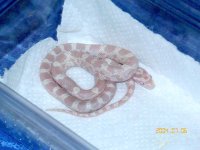
I've wanted to post a pic of my corn and I just purchased a Kodak easy share. I've taken tons of pics of my corn but the file sizes are on average 300 kb! Anybody know how to solve my lil prob? I want to show off my lil guy and I'm mad that I bought a camera to do it and I can't. :shrugs:
 
Skyclad8 said:
I've wanted to post a pic of my corn and I just purchased a Kodak easy share. I've taken tons of pics of my corn but the file sizes are on average 300 kb! Anybody know how to solve my lil prob? I want to show off my lil guy and I'm mad that I bought a camera to do it and I can't. :shrugs:

You should be able to set the picture resolution on your camara. Try setting it to 640x480 and your pictures should come out at just over 100kb.
If this fails open the picture in some sort of editor and save it again as a jpeg but adjust the compression it will save at. You will probably lose some quality doing it this way tho. 640x480 works fine for me and the picture quality is nice and sharp but i still havent worked out how to take a good pic. Hear is one i took with camara set at 640x480 and it is 114kb.
Hope this helps
 

Attachments

  • KIF_0310.JPG
    KIF_0310.JPG
    115 KB · Views: 33
I would not recommend setting your camera to a lower resolution. The only reason I say this is if you take a photo that you eventually want to print out, it will look bad (i.e. grainy). But this means you need a photo editor to reduce the size as "Stevo" said. If, however, you just want to put the photos on the web and you don't care about ever printing them, go ahead and reduce the size via the camera.
 
I'd second what Amanda E. says regarding resolution. I think just about all the digitals still come with a photo editor. Take the picks at high res and use an editor to shrink them. In a few years you won't be sorry you have the better quality pics when comparing exactly what that fine adult looked like as a hatchling. It will help you make better decissions on your keepers.
 
I use camedia on my computer to work my digital photos. I can resize them until they're what I need.
 
I also have a Kodak easyshare and I love it because it takes such beautiful, and big, pictures. leave the settings on the camera the same in case you want to play with the pictures later. Use a photo editing program, I use photosuite, and that will allow you to change the size of the photo in pixils.
 
Back
Top