• Hello!

    Either you have not registered on this site yet, or you are registered but have not logged in. In either case, you will not be able to use the full functionality of this site until you have registered, and then logged in after your registration has been approved.

    Registration is FREE, so please register so you can participate instead of remaining a lurker....

    Please be certain that the location field is correctly filled out when you register. All registrations that appear to be bogus will be rejected. Which means that if your location field does NOT match the actual location of your registration IP address, then your registration will be rejected.

    Sorry about the strictness of this requirement, but it is necessary to block spammers and scammers at the door as much as possible.

Help with PowerShot S2, please?

Weebonilass

New member
Okay, this new to me camera is driving me nuts. :( I hope someone can give me some help. We had a photo session with a dream of a model, but everything turned out graining when I pulled it from the camera.

Not sure what details to give, but these were shot in the SuperMacro mode. It was the first time I used it, so maybe that's my problem? I've heard that digital zoom can cause grainy pictures, so I had it turned off... mistake? The room was well-lit and there was no flash used.

Hoping someone can give me a clue or two. Thanks in advance.
If you need more information, please let me know.

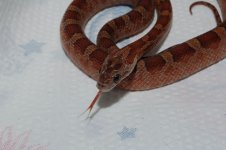
First picture...

FirstMouse_25Nov2006.jpg


Second example, not quite as bad, but not up to par :(
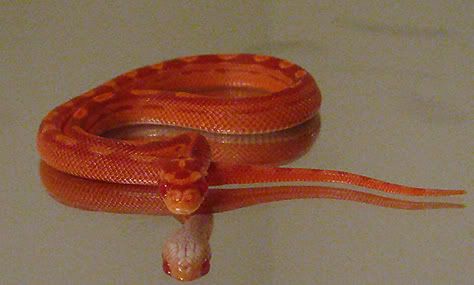
CurledonGlass2_25Nov2006.jpg
 
I have never used that particular camera before, but macro photography is when you're taking pictures of something really close up (from what I understand). Like if you wanted to get a photograph of a fly on a leaf or something. So maybe for a snake you don't need the macro mode? If I am wrong maybe someone else can help out. But that is all I can think of.
When I was in high school about ten years ago I took a photography class and loved it, so my fiance thought he would get me a nice camera last year. He got me a Canon digital SLR and I still haven't figured out how to use it. Ha. He keeps harping at me about how I should be taking amazing, professional photos. This camera has no less than 6 million features and modes. :shrugs:
I hope you figure it out. You might want to check Google for someone's guide for that camera. I found a lot of them for my camera.
 
I'm also not familiar with this particular model, but from your images it looks like the first is shot one digital zoom or possibly if you have the camera on macro mode, it's shot at a zoom longer than macro supports. Many times macro functions don't really support you zooming to the full extent that the lens will allow. The specs on the S2 say that the macro has a 0cm focus range in macro mode-- but I'm guessing it's for when the lens is at zero zoom.

I would suggest turning off the macro mode and just try zooming in on your snake from a bit of a distance. If you want more detail (e.g. scale shots), you may want to turn the macro back on and position your camera very close to the snake's body (if it'll allow it!). The swivel screen on the S2 will be very handy for that type of shot. Also, when you're that close to a subject the flash will be worthless. Better to light your snake another way than to rely on the flash.

For what it's worth, I had a S1 and loved it (but upgraded to a Canon 20D). The S2 looks like a great camera, but there is a certain amount of learning that goes into taking great pictures. If you can get the EXIF data for the pictures (like how far it was zoomed, the mode it was in, the aperture and shutter speed it shot at, etc) we can be of more help to you.

Good luck! If you have more questions, feel free to PM me.

Teague
 
Like I've said before I have the s2 Is as well and LOVE it... well you've seen some of my shots... they're stellar!

Dunno why your shots arent turning out for you, perhaps mess with the settings and that.

Here are the settings on mine... maybe this will help:

The dial majoby on top is set to the picture of the profile of the face
While in photo taking mode

hit the FUNC. Button

the first setting where it may say AWB I have it set to the 4th setting called Tungsten

Next will be greyed out ASO/AUTO - nothing is done here

Next Setting may say OFF, I have it set to V for Vivid

Flash I leave the setting as is

Next Setting I have set at 640 30 (which is the first option)

The last setting I have set at L, which will take photos at the highest pixels the camera can, you'll have less photos that can be stored with this setting but I like this setting as I can get great detail while cropping.

Hope this helps a little :cheers:
 
Thanks Lore,

I was hoping you would see this. The major difference I see in my settings is that I had it set to "P" not the portrait so that I could use the Supermacro mode. The other mode difference was that I had it set to 400 ISO/ASO.


Teague,

The digital zoom was turned off in the system. I was using Super macro mode and we were this close, which I think is pretty dang close :)

AshthePhoto_25Nov2006.jpg


Perhaps we did use too much zoom.. I'll have to try it with less zoom.
 
Ya, I found that if I zoom tooo close that its impossible for the thing to focus. However if you back up abit, take the shot, and so long as you are taking the photo at maximum resolution, you can crop it close like you want. :shrugs:

Truth be told I get a little frustrated when I try to get close ups with this camera as well... I almost liked my Fuji FinePix $60 camera better :rolleyes: only it has less mega pixels.
 
Joejr14 said:
Flash is an absolute MUST when shooting in any macro mode.
How do you stop everything getting 'whited out'? I've been trying different angles but using 2 household anglepoise lamps is the only way I'm getting enough light without the flash.
 
I was wondering the same thing.... being that close and using macro, the flash washed everything out :shrugs:

I would LOVE to know what I am doing wrong, as I would LOVE to take some nice closeups! :cheers:
 
Does the flash have a variable setting? I'm using Nikon's SB-600 and it lets me adjust the 'strength' of the flash. Sometimes I have to adjust things based on the background color or the snake.
 

Attachments

  • picture 023.jpg
    picture 023.jpg
    81.1 KB · Views: 48
LOL Lore, you're so funny :)

I didn't use the flash on these as I was in a room with overhead candelier type fixture that has four lightbulbs at 60 watts and one at 25...not sure how that happened, so felt that there was plenty of lighting. They didn't seem too dark though... just really, really grainy :(
 
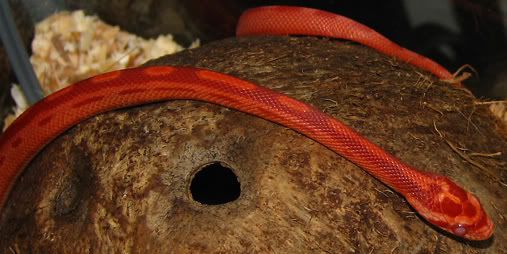
I think there is some hope for me after all... Kieran refused to be helpful at all... sour puss... But my daughter's little girl was out and about... well until the flash chased her back into her hide :) But I was happy with several of them for just being taken in her cage...

CocoNutRest_28Nov2006sm.jpg
 
Back
Top