
-
Hello!
Either you have not registered on this site yet, or you are registered but have not logged in. In either case, you will not be able to use the full functionality of this site until you have registered, and then logged in after your registration has been approved.
Registration is FREE, so please register so you can participate instead of remaining a lurker....
Please be certain that the location field is correctly filled out when you register. All registrations that appear to be bogus will be rejected. Which means that if your location field does NOT match the actual location of your registration IP address, then your registration will be rejected.
Sorry about the strictness of this requirement, but it is necessary to block spammers and scammers at the door as much as possible.
You are using an out of date browser. It may not display this or other websites correctly.
You should upgrade or use an alternative browser.
You should upgrade or use an alternative browser.
Critique my photo
- Thread starter Carinata
- Start date


airenlow
hope is not a strategy
Cropping that aggressively is going to make the image noisy every time. I think I would like the picture more if it was in color. Just mess around with all sorts of tools and see what works for you. What photo editing program are you using? GIMP is a pretty good one...and its FREE!

tyflier
[Insert Witty Commentary]
I'll be the bad guy...
It's very noisy. You can find free noise reduction software in many places on the web, as well...most editing programs have a built in noise reduction function. It makes your pictures look WAY better.
There is no contrast or clarity. In other words...it's bland. The pose is nicely done, but the photo itself lacks contrast and "pop". Adjustments to contrast and brightness will help. If you are using a newer program(within the last 2-3 years), there should be a "clarify" or "clarity" option. This feature uses shading and highlights to increase the depth of the image, giving seperation to the different layers of the picture. In your image, clarify would help to seperate the head from the body, making your subject more clear.
It looks over-sharpened. It looks like a soft or slightly out of focus picture, that you tried to sharpen in the editing program. Instead of being crisp and sharp as a tack, it looks soft, with harsh edges. This is a sign of over sharpening.
Keep trying. The pose is really nice, and should make an excellent photograph. I also like the B&W conversion, but would prefer more contrast. The composition is good, and the subject is wonderful. You just need to work on your "technique", and you'll get the picture you want...
It's very noisy. You can find free noise reduction software in many places on the web, as well...most editing programs have a built in noise reduction function. It makes your pictures look WAY better.
There is no contrast or clarity. In other words...it's bland. The pose is nicely done, but the photo itself lacks contrast and "pop". Adjustments to contrast and brightness will help. If you are using a newer program(within the last 2-3 years), there should be a "clarify" or "clarity" option. This feature uses shading and highlights to increase the depth of the image, giving seperation to the different layers of the picture. In your image, clarify would help to seperate the head from the body, making your subject more clear.
It looks over-sharpened. It looks like a soft or slightly out of focus picture, that you tried to sharpen in the editing program. Instead of being crisp and sharp as a tack, it looks soft, with harsh edges. This is a sign of over sharpening.
Keep trying. The pose is really nice, and should make an excellent photograph. I also like the B&W conversion, but would prefer more contrast. The composition is good, and the subject is wonderful. You just need to work on your "technique", and you'll get the picture you want...

Phoebeq
New member
Ok, for my quick action/portraits/long range photos I use a Nikon D70. I LOVE macro photography...I have looked into lenses for my DSLR, but they are quite pricey...I just recently bought a new Point-n-shoot camera for when I don't feel like or can't lug around my larger DSLR. It is a Canon Powershot SX110...I LOVE it. It take excellent macro photos...I can get within a half an inch and still focus on the subject...her is an example that I took yesterday.


tyflier
[Insert Witty Commentary]
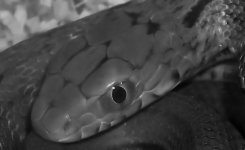
David, I hope you don't mind, but I took the liberty of "cleaning up" your photo. Aside from the digital noise issue, everything I did is completely a personal ideal of what the photo should look like. If you don't like it, I understadn. This is how I would have processed it...
Using my earlier post as a basis for what I didn't like, I took your original image, boosted the contrast, added some clarify, and performed a noise removal. After the noise removal, it still looked off. The snakes face is a little soft, but the iris is in decent focus, so I added an "edge preserving smooth". Instead of fighting with a soft focus by oversharpening, I went the other route, and chose to emphasize the soft focus in contrast with the relatively sharp iris.
I hope it at least gives you some ideas. It only took me 5 minutes...
Using my earlier post as a basis for what I didn't like, I took your original image, boosted the contrast, added some clarify, and performed a noise removal. After the noise removal, it still looked off. The snakes face is a little soft, but the iris is in decent focus, so I added an "edge preserving smooth". Instead of fighting with a soft focus by oversharpening, I went the other route, and chose to emphasize the soft focus in contrast with the relatively sharp iris.
I hope it at least gives you some ideas. It only took me 5 minutes...
Attachments

admitchell08
Read Katy Manula
Tyflier, what photo editing program do you use?


MedusaCorns
peek-a-boo!
very nice 
tyflier
[Insert Witty Commentary]
I'm using Paint Shop Pro Ultimate Photo 12. It's the newest version, and worth every penny. I think it costs like $80 or something, and it is definitely worth it's weight in gold. I don't do "graphic design", so I don't how well it works with heavy photo manipulation, but for cleanup, HDR merging, and processing...it's awesome.

MinLynn
What blonde chick?!
I use GIMP(totally free!!) and love it for editing my photos. It's pretty easy to use once you get the hang of it and there are all kinds of neat things you can do with it. Give that a try,David. Noise reduction is always one of the first things I fiddle with on my pictures, then contrast and when dealing with B&W,balancing the white and adding a little bit of "glow" to it. It really is fun to learn and play with!